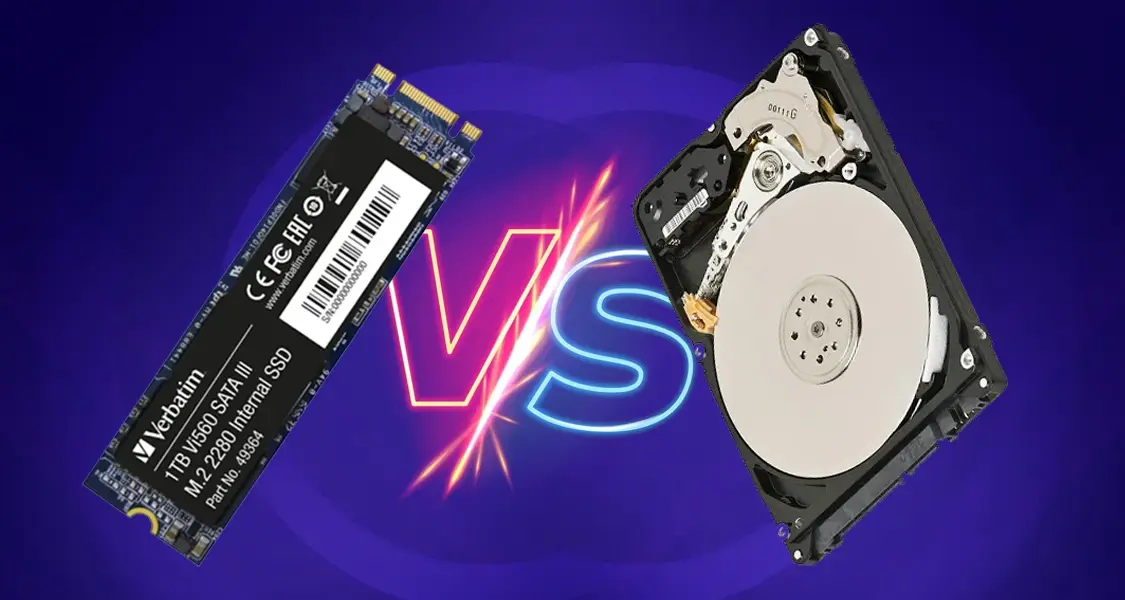
SSD vs HDD Upgrade Your Laptop for Better Performance
Nothing is more frustrating than a slow laptop. You press the power button… and wait. You click a browser… and wait. You open software… and guess what? More waiting.
In today’s fast-moving digital world, speed isn’t a luxury. It’s survival.
Whether you’re a student attending online classes, an office professional handling spreadsheets, or a gamer pushing high-end graphics, your laptop’s storage drive plays a massive role in performance. And that’s where the big debate begins: SSD vs HDD.
So, which one should you choose? And more importantly, should you upgrade your laptop storage right now?
Let’s break it down in simple terms.
What Is an HDD?
An HDD (Hard Disk Drive) is the traditional storage device that has been around for decades.
How Hard Disk Drives Work
Think of an HDD like a record player. Inside it, there are spinning disks (called platters). A mechanical arm moves back and forth to read and write data. Every time you open a file, the disk physically spins to find it.
Sounds old-school? That’s because it is.
Pros and Cons of HDD
Pros:
-
Affordable
-
Larger storage capacity for lower cost
-
Good for storing large files like movies and backups
Cons:
-
Slower performance
-
Mechanical parts can fail
-
Heavier and noisier
-
Higher power consumption
HDDs are like old reliable trucks. They get the job done — but they’re not winning any races.
What Is an SSD?
An SSD (Solid State Drive) is modern storage technology. It has no moving parts.
Buy 256GB SSD Laptop In Pakistan
How Solid State Drives Work
Instead of spinning disks, SSDs use flash memory (similar to USB drives). Data is accessed electronically, almost instantly.
It’s like comparing a bicycle to a sports car.
Pros and Cons of SSD
Pros:
-
Extremely fast
-
Durable (no moving parts)
-
Silent operation
-
Energy-efficient
-
Lightweight
Cons:
-
More expensive than HDD
-
Slightly lower storage at the same price point
If HDD is a truck, SSD is a Tesla — smooth, fast, and futuristic.
Buy 512GB SSD Laptop In Pakistan
SSD vs HDD – Speed Comparison
Here’s the biggest difference: speed.
An average HDD offers speeds of around 80–160 MB/s.
An SSD easily delivers 400–550 MB/s.
NVMe SSDs? Even 2000–3500 MB/s.
That means:
-
Windows boots in 10–15 seconds with SSD.
-
HDD may take 1–2 minutes.
And we all know — those extra minutes feel like hours when you’re in a rush.
Boot Time and Application Performance
With an SSD:
-
Laptop starts instantly.
-
Software opens quickly.
-
Browsers don’t freeze.
-
Multitasking becomes smooth.
With HDD:
-
Long loading times.
-
Lag while switching programs.
-
Frequent system slowdowns.
If your laptop feels like it’s dragging its feet, the storage drive is probably the reason.
Buy 1 TB SSD Laptop In Pakistan
Gaming and Creative Work Performance
Gamers and video editors need fast data access.
SSDs:
-
Reduce game loading times
-
Improve texture loading
-
Speed up video rendering
-
Make large file transfers quicker
HDDs:
-
Longer loading screens
-
Slower editing previews
-
Delays in heavy software like Adobe tools
If performance matters, SSD wins. No debate.
Durability and Reliability
HDD has moving parts. That means:
-
It can get damaged if dropped.
-
Mechanical failure risk is higher.
SSD has no moving parts.
-
More shock-resistant.
-
Safer for laptops.
-
Longer lifespan in portable use.
If you travel a lot or move your laptop frequently, SSD is the safer option.
Buy 2TB SSD Laptop In Pakistan
Storage Capacity Differences
HDD still wins in one area: capacity for price.
You can easily get 1TB or 2TB HDD at a lower cost.
SSDs with similar storage are more expensive — but prices are dropping every year.
Many users now combine both:
-
SSD for operating system
-
HDD for storage
Smart, right?
Price Comparison – Is SSD Worth the Cost?
Yes, SSD costs more.
But ask yourself this:
What’s more valuable — saving a little money or saving hours every week?
Time is money.
Upgrading to SSD is one of the most affordable performance boosts you can give your laptop. It feels like buying a new machine — without actually buying one.
Buy 4TB SSD Laptop In Pakistan
Power Consumption and Battery Life
SSDs consume less power.
That means:
-
Better battery life
-
Less heat generation
-
Quieter laptop
HDD drains more battery because of spinning disks.
If you’re using a laptop, SSD makes more sense.
Noise and Heat Levels
HDD:
-
Makes clicking sounds
-
Generates more heat
SSD:
-
Completely silent
-
Cooler operation
Silence + speed = perfect combo.
Buy 8 TB SSD Laptop In Pakistan
Which One Is Better for Students?
Students need:
-
Fast boot time
-
Smooth browsing
-
Reliable storage
-
Long battery life
SSD is the clear winner here.
Assignments, Zoom classes, research work — everything becomes easier.
Which One Is Better for Office Users?
If you’re handling:
-
Excel files
-
Word documents
-
Emails
-
Multiple tabs
SSD improves productivity significantly.
Less waiting. More working.
Which One Is Better for Gamers and Professionals?
Gamers, designers, developers, editors — choose SSD.
Better performance.
Faster data processing.
Improved workflow.
If you’re serious about speed, HDD simply can’t compete.
When Should You Upgrade Your Laptop Storage?
Here are some signs:
-
Laptop takes more than 1 minute to boot
-
Programs freeze frequently
-
Disk usage always shows 100%
-
Strange clicking sounds from inside
If that sounds familiar, it’s upgrade time.
Compatibility Checklist
Before upgrading:
-
Check if your laptop supports SATA SSD or NVMe.
-
Confirm storage size compatibility.
-
Consider cloning your old drive.
Most modern laptops support SSD upgrades easily.
Final Verdict – SSD or HDD?
If performance matters — SSD wins.
If budget storage matters — HDD works.
But in 2026, SSD is no longer a luxury. It’s the standard.
Upgrading from HDD to SSD feels like switching from a slow internet connection to fiber optic. Once you experience it, you can’t go back.
Conclusion
Your laptop’s performance depends heavily on its storage drive. While HDDs are cheaper and offer large capacity, SSDs deliver unmatched speed, reliability, and efficiency.
If your laptop feels slow, don’t rush to buy a new one. Upgrade to SSD first. It’s the simplest and smartest way to boost performance instantly.
At techbazaar.pk, upgrading your storage is not just a purchase — it’s an investment in speed, productivity, and peace of mind.
Ready to give your laptop the upgrade it deserves?